

Artificial intelligence and related technologies are evolving rapidly, but until recently, Java developers had few options for integrating AI capabilities directly into Spring-based applications. Spring AI changes that by leveraging familiar Spring conventions such as dependency injection and the configuration-first philosophy in a modern AI development framework.
My last tutorial demonstrated how to configure Spring AI to use a large language model (LLM) to send questions and receive answers. While this can be very useful, it does not unlock all the power that AI agents provide. In this article, you will learn exactly what an agent is and how to build one manually, then you’ll see how to leverage Spring AI’s advanced capabilities and support for building robust agents using familiar Spring conventions.
What is an AI agent?
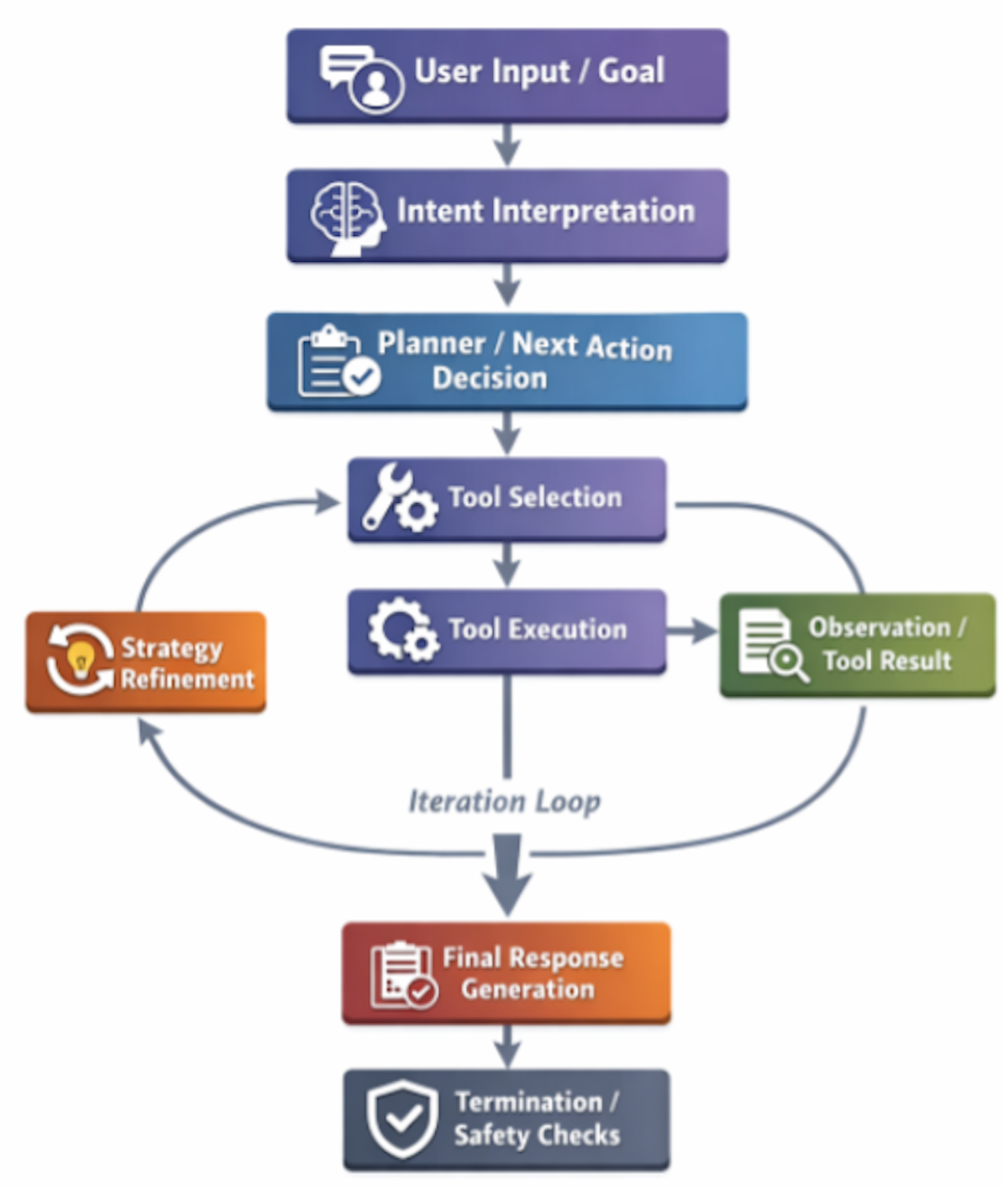
Before we dive into building an AI agent, let’s review what an agent actually is. While standard LLM interactions consist of sending a request and receiving a response, an agent is more than a chatbot and follows a more complicated set of tasks. An AI agent typically performs the following steps in sequence. We call this sequence the agent loop:
- Receives a goal
- Interprets the user’s intent
- Plans actions
- Selects tools
- Executes tools
- Observes results
- Refines strategy
- Iterates the process
- Produces a final answer
- Terminates safely
In essence, an agent accepts a user request, uses an LLM to interpret what the user really wants, and decides if it can respond directly or if it needs external support. Once a request is accepted, the agent chooses the tools it will use from the set provided, calls tools for any information it needs, and receives and incorporates that output into its working context. Next, it decides whether the preliminary result is sufficient or if it needs to call additional tools to reach a satisfactory end. The agent repeats this plan-act-observe cycle until the objective is satisfied. Once satisfied, it returns a completed answer. It stops execution based on a completion indicator, safety checks, or the given iteration limit.
The following diagram visualizes the agent loop:
Steven Haines
If this sounds a little abstract, try asking your favorite chatbot, such as ChatGPT, to help you do something that requires a knowledge base and a few steps. In the example below, I prompted ChatGPT to help me bake a cake:
I want to bake a cake. Can you tell me what to do step-by-step, one step at a time? Tell me each step to perform and I will tell you the results. Please start with the first step.The model in this case responded with a list of ingredients, then asked if I had everything I needed. I responded that I did not have eggs, so it offered a list of substitutions. Once I had all the ingredients, the model told me to mix them and continued with step-by-step instructions to bake a cake. As a test, once the cake was baking, I reported that I thought it might be burning. The model responded that I should turn down the oven temperature, cover the cake with aluminum foil, and describe what it looked like to determine if it could be salvaged.
So, in this exercise, the LLM planned out what to do, walked through the process one step at a time, and used me as a “tool” to perform the actions needed and report the results. When things didn’t work out as expected, such as missing ingredients or a burning cake, it adapted the plan to still achieve its objective. This is exactly what agents do, but relying on a set of programmatic tools, rather than a hungry human, to perform the needed actions. This may be a silly example, but it illustrates the key elements of agent behavior, including planning, use of tools, and the ability to adapt to changing circumstances.
As another example, consider the difference between using a ChatGPT conversation to generate code versus using an AI coding tool like Claude. ChatGPT responds to your prompts with code to copy-and-paste into your application. It is up to you to paste in the code, and also build and test it. Claude, on the other hand, has its own tools and processes. Namely, it can search through the files on your file system, create new files, run build scripts like Maven, see the results, and fix build errors. Whereas ChatGPT is a chatbot that relies on you to do the work, Claude is a complete coding agent: You provide it with an objective and it does the coding for you.
Also see: What I learned using Claude Sonnet to migrate Python to Rust.
Building a Spring AI agent
Now that you have a sense of what an AI agent is, let’s build one with Spring AI. We’ll do this in two phases: First, we’ll build our own agent loop and do everything manually, so that you can understand exactly how agents work and what Spring AI does behind the scenes; then we’ll leverage the capabilities built into Spring AI to make our job easier.
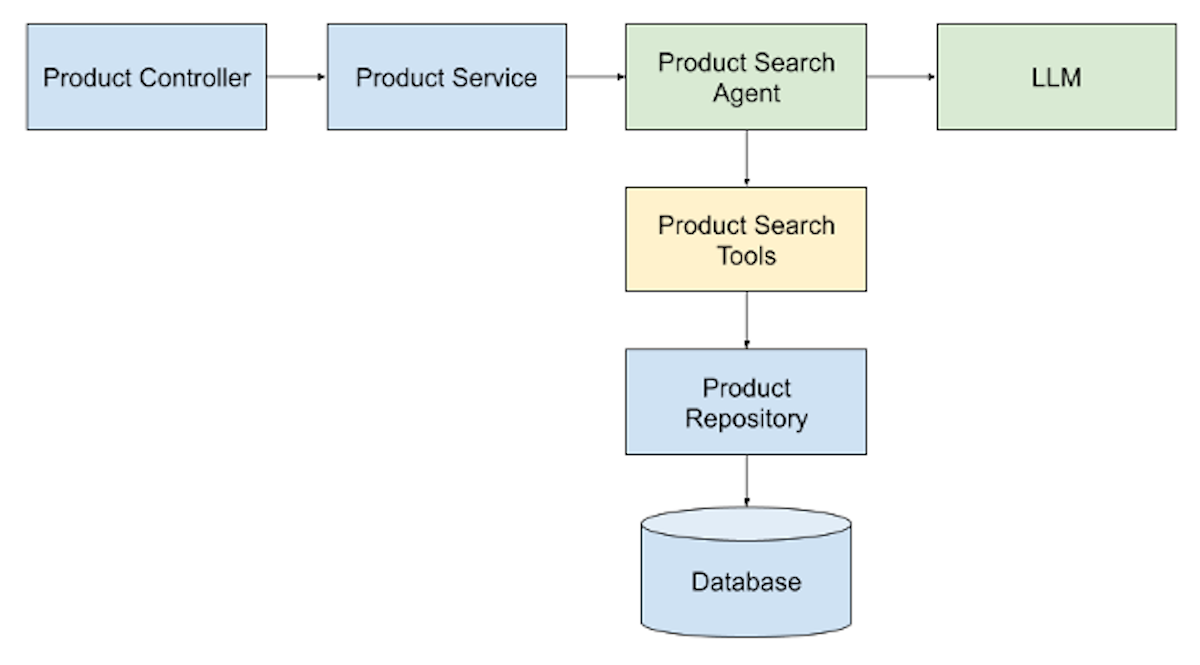
For our example, we’ll build the product search agent illustrated in the diagram below:
Steven Haines
Note that this demonstration assumes you are familiar with Java development and with Spring coding conventions.
Defining the product search tool
To start, we have a database that contains over 100 products and a Spring MVC controller to which we can POST a natural language query for products. As an example, we might enter, “I want sports shoes that cost under $120.” The controller calls a service that leverages our product search agent to work with an LLM and searches the database. The tool that we’re building uses a repository that has a simple keyword search query that runs against product names and descriptions. The LLM is responsible for determining the user’s intent, choosing the most applicable keywords to search for, calling the tool to retrieve products that match each keyword, and returning the list of relevant products.
Here’s the Product class:
package com.infoworld.springagentdemo.model;

import jakarta.persistence.Entity;
import jakarta.persistence.GeneratedValue;
import jakarta.persistence.GenerationType;
import jakarta.persistence.Id;

@Entity
public class Product {
    @Id
    @GeneratedValue(strategy = GenerationType.AUTO)
    private Long id;
    private String name;
    private String description;
    private String category;
    private Float price;

    public Long getId() {
        return id;
    }
    public void setId(Long id) {
        this.id = id;
    }
    public String getName() {
        return name;
    }
    public void setName(String name) {
        this.name = name;
    }
    public String getDescription() {
        return description;
    }
    public void setDescription(String description) {
        this.description = description;
    }
    public String getCategory() {
        return category;
    }
    public void setCategory(String category) {
        this.category = category;
    }
    public Float getPrice() {
        return price;
    }
    public void setPrice(Float price) {
        this.price = price;
    }
}
The Product class is a JPA entity with an id, name, description, category, and price. The repository is a JpaRepository that manages products:
package com.infoworld.springagentdemo.repository;

import java.util.List;

import com.infoworld.springagentdemo.model.Product;

import org.springframework.data.jpa.repository.JpaRepository;
import org.springframework.data.jpa.repository.Query;
import org.springframework.data.repository.query.Param;

public interface ProductRepository extends JpaRepository {
    @Query("""
       SELECT p FROM Product p
       WHERE lower(p.name) LIKE lower(concat('%', :query, '%'))
          OR lower(p.description) LIKE lower(concat('%', :query, '%'))
    """)
    List search(@Param("query") String query);
}
We added a custom search method with a query that returns all products with a name or description that matches the specified query string.
Now let’s look at the ProductSearchTools class:
package com.infoworld.springagentdemo.ai.tools;

import java.util.List;

import com.infoworld.springagentdemo.model.Product;
import com.infoworld.springagentdemo.repository.ProductRepository;

import org.springframework.ai.tool.annotation.Tool;
import org.springframework.stereotype.Component;

@Component
public class ProductSearchTools {

    private final ProductRepository repository;

    ProductSearchTools(ProductRepository repository) {
        this.repository = repository;
    }

    @Tool(description = "Search products by keyword")
    public List searchProducts(String keyword) {
        return repository.search(keyword);
    }
}
The ProductSearchTools class is a Spring-managed bean, annotated with the @Component annotation, and defines a searchProducts() method that calls the repository’s search() method. You’ll learn more about the @Tool annotation when we use Spring AI’s built-in support for tools. For now, just note that this annotation marks a method as a tool that the LLM can call.
Developing the agent
With the tool defined, let’s look at the ManualProductSearchAgent, which is the explicit version of our search agent in which we define our agent loop manually:
package com.infoworld.springagentdemo.ai.agent;

import java.util.ArrayList;
import java.util.List;

import com.fasterxml.jackson.core.JsonProcessingException;
import com.fasterxml.jackson.databind.ObjectMapper;
import com.infoworld.springagentdemo.ai.tools.ProductSearchTools;
import com.infoworld.springagentdemo.model.Product;

import org.springframework.ai.chat.client.ChatClient;
import org.springframework.ai.chat.messages.AssistantMessage;
import org.springframework.ai.chat.messages.Message;
import org.springframework.ai.chat.messages.SystemMessage;
import org.springframework.ai.chat.messages.UserMessage;
import org.springframework.ai.chat.prompt.Prompt;
import org.springframework.stereotype.Component;

@Component
public class ManualProductSearchAgent {

    private final ChatClient chatClient;
    private final ProductSearchTools productSearchTools;
    private final ObjectMapper objectMapper;
    private final int MAX_ITERATIONS = 10;

    public ManualProductSearchAgent(ChatClient.Builder chatClientBuilder,
                                    ProductSearchTools productSearchTools) {
        this.chatClient = chatClientBuilder.build();
        this.productSearchTools = productSearchTools;
        this.objectMapper = new ObjectMapper();
    }

    public List search(String userInput) {

        List messages = new ArrayList<>();

        // System Prompt with Tool Specification
        messages.add(new SystemMessage("""
                You are a product search agent.

                You have access to the following tool:

                Tool Name: searchProducts
                Description: Search products by keyword
                Parameters:
                {
                  "keyword": "string"
                }

                You may call this tool multiple times to refine your search.

                If the user request is vague, make reasonable assumptions.

                If the user asks about products in a certain price range, first search for the products and then filter
                the results based on the price. Each product is defined with a price.

                You must respond ONLY in valid JSON using one of these formats:

                To call a tool:
                {
                  "action": "tool",
                  "toolName": "searchProducts",
                  "arguments": {
                    "keyword": "..."
                  }
                }

                When finished:
                {
                  "action": "done",
                  "answer": "final response text",
                  "products": "a list of matching products"
                }

                Do not return conversational text.
                """));

        messages.add(new UserMessage(userInput));

        // Manual Agent Loop
        int iteration = 0;
        while (iteration++ < MAX_ITERATIONS) {

            try {
                String response = chatClient
                        .prompt(new Prompt(messages))
                        .call()
                        .content();

                AgentDecision decision =
                        objectMapper.readValue(response, AgentDecision.class);

                if ("done".equalsIgnoreCase(decision.action())) {
                    return decision.products();
                }

                if ("tool".equalsIgnoreCase(decision.action())) {

                    // Manual Tool Dispatch
                    if ("searchProducts".equals(decision.toolName())) {

                        String keyword =
                                decision.arguments().get("keyword");

                        List result =
                                productSearchTools.searchProducts(keyword);

                        String observation =
                                objectMapper.writeValueAsString(result);

                        // Feed Observation Back Into Context
                        messages.add(new AssistantMessage(response));

                        messages.add(new SystemMessage("""
                                Tool result from searchProducts:
                                """ + observation));
                    }
                }
            } catch (JsonProcessingException e) {
                System.out.println(e.getMessage());
            }
        }
        return new ArrayList<>();
    }
}
The ManualProductSearchAgent constructor accepts a ChatClient.Builder that it uses to build a ChatClient. If you have not read the Getting Started with Spring AI article yet, the ChatClient class is Spring AI’s abstraction to interacting with an LLM. It is configured in the application.yaml file as follows:
spring:
  application:
    name: spring-aiagent-demo
  ai:
    openai:
      api-key: ${OPENAI_API_KEY}
      chat:
        options:
          model: gpt-5
          temperature: 1
  jpa:
    defer-datasource-initialization: true
In this case, I opted to use OpenAI and pass in my API key as an environment variable. It uses the gpt-5 model with a temperature of 1, which is required by Spring AI. (See the first tutorial if you need to more information.) If you download the source code and define an OPEN_API_KEY environment variable, you should be able to run the code.
Next, the constructor accepts a ProductSearchTools instance and then creates a Jackson ObjectMapper to deserialize JSON into Java classes. The search() method is where the agent is defined. First, it maintains a list of messages that will be sent to the LLM. These come in three forms:
SystemMessage: The message that defines the role of the agent. It defines the steps it should take, as well as the rules it should follow.UserMessage: The message that the user passed in, such as “I want sports shoes that cost less than $120.”AssistantMessage: These messages contain the history of the conversation so that the LLM can follow the conversation.
The above prompt defines the initial system message. We inform the LLM that it is a product search agent that has access to one tool: the searchProducts tool. We provide a description of the tool and tell the LLM that it must pass a keyword parameter as a String. Next, we tell it that it can call the tool multiple times and give it some additional instructions. I purposely added the instruction that if the user asks for products in a certain price range, the LLM should first search for the products and then filter on the price. Before I added this instruction, the LLM included the price in the search, which yielded no results. The key takeaway here is that you are going to need to experiment with your prompt to get the results you are seeking.
Next, we tell the LLM that, to call a tool, it should return an action of “tool” and a tool name and arguments. If we gave it more tools, it is important that it tells us exactly what tool to execute. Finally, we define the format of the message it should return when it is finished; namely, an action of “done,” an answer String, and a list of products.
After adding our prompt as a SystemMessage, we add the user’s query as a UserMessage. Now, the LLM knows what it is supposed to do, what tools it has access to, and the goal that it must accomplish.
Implementing the agent loop
Next, we implement our agent loop. We defined a MAX_ITERATIONS constant of 10, which means that we will only call the LLM a maximum of 10 times. The number of iterations you need in your agent will depend on what you are trying to accomplish, but the purpose is to restrict the total number of LLM calls. You would not want it to get into an infinite loop and consume all your API tokens.
The first thing we do in our agent loop is construct a prompt from our list of messages and call the LLM. The content() method returns the LLM response as a String. We could have used the entity() method to convert the response to an AgentDecision class instance, but we leave it as a String and manually convert it using Jackson so that we can add the response as an AssistantMessage later to keep track of the conversation history. An AgentDecision is defined as follows:
package com.infoworld.springagentdemo.ai.agent;

import java.util.List;
import java.util.Map;

import com.infoworld.springagentdemo.model.Product;

public record AgentDecision(
    String action,
    String toolName,
    Map arguments,
    String answer,
    List products) {
}
We check the AgentDecision action to see if it is “done” or if it wants to invoke a “tool.” If it is done, then we return the list of products that it found. If it wants to invoke a tool, then we check the tool that it wants to invoke against the name “searchProducts,” extract the keyword argument that it wants to search for, and call the ProductSearchTool’s searchProducts() method. We save the query response and add it as a new SystemMessage and we store the LLM’s request for the tool call as an AssistantMessage.
We continue the process until we reach the maximum number of iterations or the LLM reports that it is done.
Testing the AI agent
You can use the following controller to test the agent:
package com.infoworld.springagentdemo.web;

import java.util.List;

import com.infoworld.springagentdemo.model.Product;
import com.infoworld.springagentdemo.model.SearchRequest;
import com.infoworld.springagentdemo.service.ProductService;

import org.springframework.web.bind.annotation.GetMapping;
import org.springframework.web.bind.annotation.PostMapping;
import org.springframework.web.bind.annotation.RequestBody;
import org.springframework.web.bind.annotation.RestController;

@RestController
public class ProductController {
    private ProductService productService;

    public ProductController(ProductService productService) {
        this.productService = productService;
    }

    @GetMapping("/products")
    public List getProducts() {
        return productService.findAll();
    }

    @PostMapping("/search")
    public List searchProducts(@RequestBody SearchRequest request) {
        return productService.findProducts(request.query());
    }

    @PostMapping("/manualsearch")
    public List manualSearchProducts(@RequestBody SearchRequest request) {
        return productService.findProductsManual(request.query());
    }
}
This controller has a getProducts() method that returns all products, a searchProducts() method that will use Spring AI’s built-in support for tools, and a manualSearchProducts() method that calls the agent we just built. The SearchRequest is a simple Java record and is defined as follows:
package com.infoworld.springagentdemo.model;

public record SearchRequest(String query) {
}
The ProductService is a passthrough service that invokes the agent, or the repository in the case of listing all products:
package com.infoworld.springagentdemo.service;

import java.util.List;

import com.infoworld.springagentdemo.ai.agent.ManualProductSearchAgent;
import com.infoworld.springagentdemo.ai.agent.ProductSearchAgent;
import com.infoworld.springagentdemo.model.Product;
import com.infoworld.springagentdemo.repository.ProductRepository;

import org.springframework.stereotype.Service;

@Service
public class ProductService {
    private final ProductRepository productRepository;
    private final ProductSearchAgent productSearchAgent;
    private final ManualProductSearchAgent manualProductSearchAgent;

    public ProductService(ProductRepository productRepository, ProductSearchAgent productSearchAgent, ManualProductSearchAgent manualProductSearchAgent) {
        this.productRepository = productRepository;
        this.productSearchAgent = productSearchAgent;
        this.manualProductSearchAgent = manualProductSearchAgent;
    }

    public List findAll() {
        return productRepository.findAll();
    }

    public List findProducts(String query) {
        return productSearchAgent.run(query);
    }

    public List findProductsManual(String query) {
        return manualProductSearchAgent.search(query);
    }
}
You can test the application by POSTing a request to /manualsearch with the following body:
{
    "query": "I want sports shoes under $120"
}
Your results may be different from mine, but I saw the LLM searching for the following keywords:
Searching products by keyword: sports shoes
Searching products by keyword: running shoes
Searching products by keyword: sports shoes
Searching products by keyword: running shoes
Searching products by keyword: athletic shoes
And I received the following response:
[
    {
        "category": "Clothing",
        "description": "Lightweight mesh running sneakers",
        "id": 24,
        "name": "Running Shoes",
        "price": 109.99
    },
    {
        "category": "Clothing",
        "description": "Cross-training athletic shoes",
        "id": 83,
        "name": "Training Shoes",
        "price": 109.99
    }
]
So, the agent effectively determined what I meant by “sports shoes,” selected some relevant keywords to search for, filtered the products based on price, and returned a list of two options for me. Because LLMs are not deterministic, your results may be different from mine. For example, in other runs with the same query, the agent searched for different keywords and returned a larger list. But being able to translate a natural language query into a set of database queries and find relevant results is impressive!
Spring AI’s built-in support for developing agents
Now that you understand what an agent loop is, what it does, and how to handle tool executions, let’s look at Spring AI’s built-in support for managing its own agent loop and tool execution. Here is our updated ProductSearchAgent code:
package com.infoworld.springagentdemo.ai.agent;

import java.util.ArrayList;
import java.util.List;

import com.infoworld.springagentdemo.ai.tools.ProductSearchTools;
import com.infoworld.springagentdemo.model.Product;

import org.springframework.ai.chat.client.ChatClient;
import org.springframework.ai.chat.messages.Message;
import org.springframework.ai.chat.messages.SystemMessage;
import org.springframework.ai.chat.messages.UserMessage;
import org.springframework.ai.chat.prompt.Prompt;
import org.springframework.ai.tool.method.MethodToolCallbackProvider;
import org.springframework.stereotype.Component;

@Component
public class ProductSearchAgent {

    private final ChatClient chatClient;
    private final ProductSearchTools productSearchTools;

    public ProductSearchAgent(ChatClient.Builder chatClientBuilder, ProductSearchTools productSearchTools) {
        this.chatClient =  chatClientBuilder.build();
        this.productSearchTools = productSearchTools;
    }

    public List run(String userRequest) {

        Prompt prompt = buildPrompt(userRequest);

        AgentResponse response = chatClient
                .prompt(prompt)
                .toolCallbacks(
                        MethodToolCallbackProvider.builder().toolObjects(productSearchTools).build()
                )
                .call()
                .entity(AgentResponse.class);

        System.out.println(response.answer());
        return response.products();
    }

    private Prompt buildPrompt(String userRequest) {

        List messages = new ArrayList<>();

        // 1. System message: defines the agent
        messages.add(new SystemMessage("""
You are a product search agent.

Your responsibility is to help users find relevant products using the available tools.

Guidelines:
- Use the provided tools whenever product data is required.
- You may call tools multiple times to refine or expand the search.
- If the request is vague, make reasonable assumptions and attempt a search.
- Do not ask follow-up questions.
- Continue using tools until you are confident you have the best possible results.

If the user asks about products in a certain price range, first search for the products and then filter
the results based on the price. Each product is defined with a price.

When you have completed the search process, return a structured JSON response in this format:

{
  "answer": "...",
  "products": [...]
}

Do not return conversational text.
Return only valid JSON.
"""));

        // Add the user's request
        messages.add(new UserMessage(userRequest));

        return new Prompt(messages);
    }
}
As I mentioned earlier, the ProductSearchTools’ searchProducts() method is annotated with the @Tool annotation. This annotation has special meaning for Spring AI if we add a toolCallbacks() method call to our LLM call. In this case, we autowire the ProductSearchTools into our constructor and then invoke the toolCallbacks() method in our LLM call, passing it a list of all the classes containing tools we want to give the LLM access to in a MethodToolCallbackProvider.builder().toolObjects() call. Spring AI will see this list of tools and do a few things:
- Introspect all methods annotated with the
@Toolannotation in the provided classes. - Build the tool specification and pass it to the LLM for us, including the description of the tool and the method signature, which means that we no longer need to explicitly define the tool specification in our
SystemPrompt. - Because it has access to call the tools, the
ChatClient’scall()method will run in its own agent loop and invoke the tools it needs for us.
Therefore, the response we receive will be the final response from the LLM with our list of products, so we do not need to build an agent loop ourselves. We build our prompt with a system prompt (which again does not have the tool specification) and the user’s request. We then make a single call to the call() method, which performs all the actions it needs to arrive at a conclusion.
You can test it by executing a POST request to /search with the same SearchRequest payload and you should see similar results. Claude was kind enough to generate my test products for me, so feel free to search for shirts, jackets, pants, shoes, and boots. You can find the full list of products preconfigured in the database in the src/resources/import.sql file.
Conclusion
This tutorial introduced you to using Spring AI to build AI agents. We began by reviewing what an agent is, which in its simplest form is a class that receives an objective. The agent makes repeated calls to an LLM, first to make a step-by-step plan to meet the objective, and then to execute the plan using whatever tools were provided.
To give you a really good sense of what agents are, we manually built an agent loop, executed tools, and interacted with the LLM through SystemMessages, AssistantMessages, and UserMessages. Then, we leveraged Spring AI’s capabilities to let the agent execute tools on its own. Spring AI provides Spring developers with all the tools needed to build complex AI applications, including an LLM abstraction, through the ChatClient class and a YAML configuration, built-in support for discovering and executing tools, and a built-in agent loop to remove the complexity of manually writing code yourself.
With what you learned in this tutorial, you should be able to start building Spring AI agents on your own. You could try developing your own coding assistant, an agent that downloads and summarizes articles from the Internet, or even an agent that translates natural language into database queries. All you need to do is build the tools, write the prompts, and leverage Spring AI’s agent development capabilities and support.
Go to Source
Author: