


When we shipped a new feature last quarter, it would have taken three months to build traditionally. It took two weeks. Not because we cut corners or hired contractors, but I fundamentally changed how we create user interfaces.
The feature was a customer service dashboard that adapts its layout and information density based on the specific issue a representative is handling. A billing dispute shows different data than a technical support case. A high-value customer gets a different view than a standard inquiry. Previously, building this meant months of requirements gathering, design iterations and front-end development for every permutation.
Instead, I defined my team to use generative UI: AI systems that create interface components dynamically based on context and user needs.
What does generative UI mean in reality?
The range of possibilities here is broad. On one end of the spectrum, developers use AI to generate code to build an interface more quickly. On the far end, interfaces are dynamically assembled entirely at runtime.
I lead and implemented an approach that exists somewhere in between. We specify a library of components and allowable layout patterns that define the constraints of our design system. The AI then chooses components from this library, customizes them based on context and lays them out appropriately for each unique user interaction.
The interface never really gets designed — it just gets composed on demand using building blocks we’ve already designed.
Applied to our customer service dashboard, we can feed information about the customer record, type of issue, support rep’s role and experience, and recent history into the system to assemble an interface tailor-made to be most effective for that situation. An expert rep assisting with a complex technical problem will see system logs and advanced troubleshooting tools. A new rep assisting with a basic billing inquiry will see simplified information and workflow guidance.
Both interfaces would look different but are assembled from the common library of components designed by our UI team.
The technical architecture
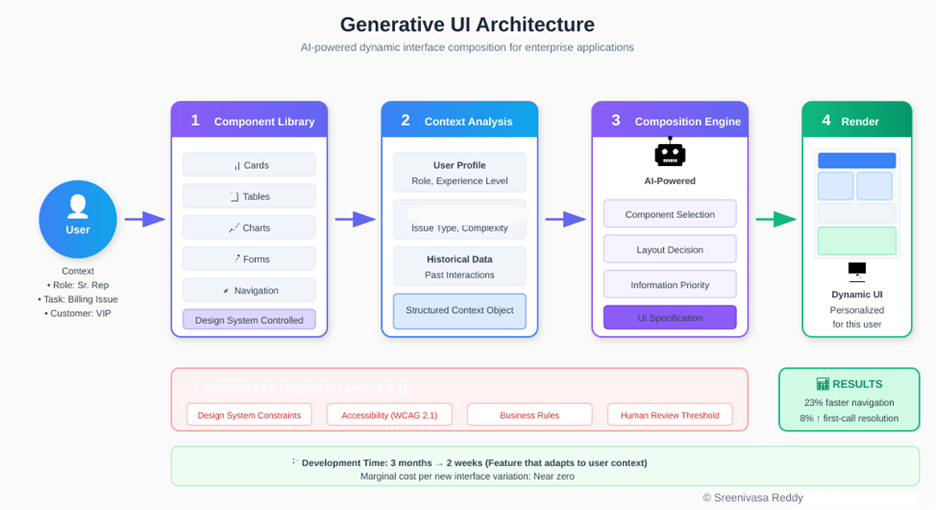
Our generative UI system has four layers, each with clear responsibilities.
Sreenivasa Reddy Hulebeedu Reddy
- The component library layer: It contains all approved UI elements: cards, tables, charts, forms, navigation patterns and layout templates. This follows the principles of design systems. Each component has defined parameters, styling options and behavior specifications. This layer is maintained by our design system team and represents the visual and interaction standards for our applications.
- The context analysis layer: Thisprocesses information about the current user, their task and relevant data. For customer service, this includes customer attributes, issue classification, historical interactions and representative profile. This layer transforms raw data into structured context that informs interface generation.
- The composition engine layer: Hereis where AI enters the picture. Given the available components and the current context, this layer determines what to show, how to arrange it and what level of detail to present. We use a fine-tuned language model that has learned our design patterns and business rules through extensive examples.
- The rendering layer: Ittakes the composition specification and produces the actual interface. This layer handles the technical details of turning abstract component descriptions into rendered UI elements.
How we built it
We built the generative UI system over the course of four months. The first step was building the component library. Our design team took an inventory of every UI pattern deployed across our customer service applications. 27 components in all, from simple data cards to interactive tables. Each component was parameterized based on what data to show, how to react to user input and how to adjust to screen sizes, among other properties. The result was our component library.
The context analysis layer then had to interface with three different backends. Our CRM, which stores information about customers, our ticketing system, which has details about issue classifications, and our workforce management system, which maintains representative profiles. Each of these systems required adapters that would funnel context data into a normalized context object that the composition engine could read.
Finally, for the composition engine, we performed “prompt tuning” on a language model with 2k demonstrations of how our designers mapped context to interface by hand. The model learned relations such as “complex technical issue + senior rep => detailed diagnostic view” without those explicit rules being programmed. Instead of hardcoding thousands of if/then statements, we were able to bake designer knowledge into the model.
The system is deployed onto our cloud architecture, which serves the UI with a latency of less than 200ms, making the generation process invisible to users.
Guardrails that make it enterprise-ready
Generative systems require constraints to be enterprise-ready. We learned this through early experiments where the AI made creative but inappropriate interface decisions that are technically functional but violate brand guidelines or accessibility standards.
Our guardrails operate at multiple levels. Design system constraints ensure every generated interface complies with our visual standards. The AI can only select from approved components and can only configure them within approved parameter ranges. It cannot invent new colors, typography or interaction patterns.
Accessibility requirements are non-negotiable filters. Every generated interface is validated against WCAG guidelines before rendering. Components that would create accessibility violations are automatically excluded from consideration.
Business rule constraints encode domain-specific requirements. Certain data elements must always appear together. Certain actions require specific confirmations. Customer financial information has display requirements regardless of context. These rules are defined by business stakeholders and enforced by the system.
Human review thresholds trigger manual approval for unusual compositions. If the AI proposes an interface significantly different from historical patterns, it’s flagged for designer review before deployment.
Where it works and where it doesn’t
Generative UI isn’t a universal solution. It excels in specific contexts and creates unnecessary complexity in others.
It works well for high-variation workflows where users face different situations requiring different information. Customer service, field operations and case management applications benefit significantly. It also works for personalization at scale, when you need to adapt interfaces for different user roles, experience levels or preferences without building separate versions for each.
It doesn’t make sense for simple, low-variation interfaces where a single well-designed layout serves all users effectively. A settings page or login screen doesn’t need dynamic generation. It’s also the wrong approach for highly regulated forms where the exact layout is mandated by compliance requirements like tax forms, legal documents or medical intake forms, should remain static and auditable.
The investment in building a generative UI system only pays off when interface variation is a genuine problem. If you’re building ten different dashboards for ten different user types, it’s worth considering. If you’re building one dashboard that works for everyone, stick with traditional methods.
Why this matters for enterprise development
Enterprise application development tends to follow a tried-and-true formula. Stakeholders express requirements. Designers mockup solutions. Developers implement interfaces. QA exercises the whole system. Repeat for each new requirement or variant context.
It’s a process that produces results. However, it doesn’t scale well and tends to be slow. Say we want to build a customer service application. Different issue types require different information views. Different customers may see different interfaces. Support reps may see different screens based on their role or channel of interaction. Manually designing and building every combination would take forever (and a lot of money). Instead, we settle, we build flexible but mediocre interfaces that reasonably accommodate every situation.
Generative UI eliminates this compromise. Once you’ve built the system, the cost of adding a new variant of the UI becomes negligible. Rather than picking ten use cases to design perfectly for, we can accommodate hundreds.
In our case, the business results were profound. Service reps spent 23% less time scrolling through screens to find the info they needed. First call resolution increased by 8%. Reps gave higher satisfaction ratings because they felt like the software was molded to their needs instead of forcing them into a one-size-fits-all process.
Organizational implications
Adopting generative UI changes how design and development teams work.
Designers shift from creating specific interfaces to defining component systems and composition rules. This is a different skill set that needs more systematic thinking, more attention to edge cases, more collaboration with AI systems. Some designers find this liberating; others find it frustrating. Plan for change management.
Developers focus more on infrastructure and less on UI implementation. Building and maintaining the generative system requires engineering investment, but once operational, the marginal effort per interface variation drops dramatically. This frees developer capacity for other priorities.
Quality assurance becomes continuous rather than episodic. With dynamic interfaces, you can’t test every possible output. Instead, you validate the components, the composition rules and the guardrails. As Martin Fowler notes about testing strategies, QA teams need new tools and methodologies for this kind of testing.
How to adopt generative UI
My advice to IT leaders evaluating generative UI is to start small with a pilot program to prove value before scaling across your organization. Find a workflow with high variability that has measurable results. Turn on generative UI for that single use case. Measure the impact to user productivity, satisfaction and business outcomes. Leverage those results to secure further investment.
Focus on your component library before enabling dynamic composition. The AI can only create great experiences if it has great building blocks. Focus on design system maturity before you prioritize generative features.
Define your guardrails up front. The guardrails that will make your generative UI solution enterprise-ready are not an afterthought. They’re requirements. Build them in lockstep with your generative features.
The future looks bright
The move from static interfaces to generative interfaces is really just one example of a larger trend we’re starting to see play out across enterprise software: The gradual shift from “static” technology designed for the most-common use cases upfront to dynamic technology that can adapt to the user’s context as they need it.
We’ve already started to see this play out with search, recommendations and content. UI is next.
For forward-looking enterprises that are willing to put in the upfront work to create robust component libraries, establish governance frameworks and build thoughtful AI integrations, Generative UI can enable applications that work for your users, instead of the other way around.
And that’s not just an incremental improvement in efficiency. That’s a whole new way of interacting with enterprise software.
This article is published as part of the Foundry Expert Contributor Network.
Want to join?
Go to Source
Author: