


Ever since Electron’s first release, developers have both rejoiced and lamented. Electron offers a convenient way to package a web-UI application across platforms, with almost exactly the same behavior, UI/UX, and underlying codebase everywhere. But it also imposes a large memory and disk-space footprint, bundling a full copy of a web browser and JavaScript runtime for all the convenience it provides.
A whole roster of competing projects have emerged to try to deliver the same convenience and consistency without the bloat. Tauri uses Rust to build a small deliverable and invoke the system-native web view as one of its front-end options, but requires learning and using Rust.
Another recent contender is Electrobun. This project uses the Bun runtime for JavaScript, which also allows for writing applications directly in TypeScript. Electrobun claims to produce far smaller bundles than regular Electron, as it does not require a bundled browser to work. And it comes with its own differential update technology, so you don’t have to roll your own update mechanism or deliver multi-megabyte patches to fix a single issue.
Setting up an Electrobun application
Before you can begin using Electrobun, you will need to have Bun installed. Once you have your Bun installation, you can run bun install electrobun to set up Electrobun as a dependency. You can then quickly set up an Electrobun project’s scaffolding with the command bunx electrobun init, with sample application templates available by default:
- The
srcdirectory contains a directory for the application code (underbun) and a directory for the HTML views (mainview). - The file
electrobun.config.tsdescribes the project’s configuration and build data—what directories or files to copy for the build process, whether or not to bundle the browser, the entry point for the app, and so on.
Any other files present in the directory will be common to other Bun or TypeScript projects, such as the bun.lock file or the package.json and tsconfig.json files.
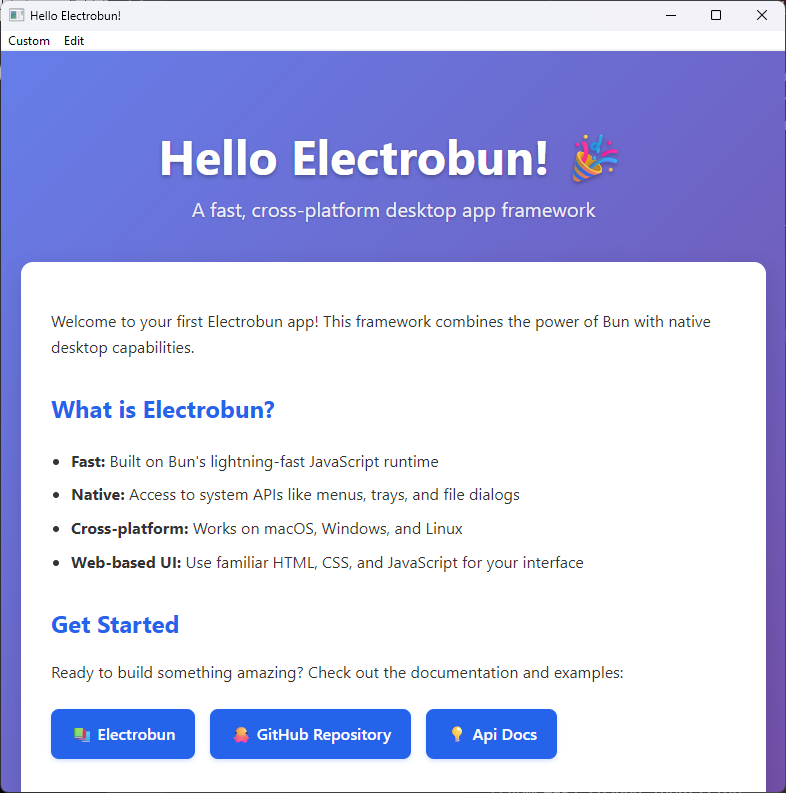
If you run the above init command, you’ll get a sample application you can launch and run immediately in development mode with the command bun start.
A basic “hello world” application created with Electrobun. The menus, window fixtures, icon, and tray presence are all customizable.
Foundry
To build the app into a distribution artifact, use the command bunx electrobun build. Add the --env=stable flag to produce a non-development build, and to invoke any patch generation you might have configured. (More on this later.) The resulting setup package will appear in an artifacts directory. On Windows, you’re given a self-extracting installer, but you can also redistribute a .zip archive that can just be unpacked in place.
You can elect to bundle an instance of the browser with the application or use the system’s native web view. For Linux systems, or environments where you want to guarantee feature behavior, you’ll want to bundle the browser, although this makes the download size and the on-disk footprint much bigger. The size of a compressed “hello world” download without the browser included is generally around 30MB.
Front-end and back-end development
Electrobun has no preferred front-end framework. You can use vanilla JavaScript or TypeScript as your front end, or you can use common front ends like Svelte, Angular, or React. The included boilerplate examples provide simple examples of applications written with Svelte along with React, Tailwind, or Vite.
The back end is typically written in TypeScript, but anything that can be shipped as a Bun or NPM dependency will work. To access Electrobun’s APIs, you just import them: import Electrobun from "electrobun/bun"; or import {BrowserWindow, ApplicationMenu,} from "electrobun/bun";.
Electrobun’s API provides interfaces to the common components you’d use to create a desktop app:
- BrowserWindow: The application window itself, so named because it uses a web browser, although it won’t be default display things like the address bar or navigation buttons.
- BrowserView: The actual web browser contained in the window. This can be used as-is for a single view, or it can contain multiple
electrobun-webviewtags, each of which creates its own standalone browser document (essentially, aniframebut with more control). - ContextMenu: Gives you control over the right-click context menu that pops up. This can be invoked even when the Electrobun app isn’t in focus.
- ApplicationMenu: The app’s own window menu, which uses UI-native window-menu styling, including accelerator keys. Note that this is not currently supported on Linux.
- Tray: Access to the system tray icon. However, pop-up notifications or “toasts” that appear in that area are not currently supported.
Electrobun apps also come with a wealth of pre-defined events that you can hook into, either locally or globally. For instance, a navigation event can be hooked at the application level (global), or at the web view level (local), or both. Local events fire before global ones, so you can perform things like an orderly teardown of resources.
The app’s build configuration also has its own API. This lets you write hooks for behaviors that, for instance, only manifest when you’ve built the app in dev mode.
Application delivery and updates
Some application frameworks include an installer mechanism, but few of them offer a way to upgrade an already-installed instance of the app. Electrobun has its own update API, which includes mechanisms for checking for updates and generating patch files for each release. Patches are differential; they contain only changes from the past release, so they tend to be very lightweight unless you include significant changes like new dependencies.
Note that patches are only downloaded and applied if the user is upgrading from the immediately previous release of the program. If the user downloaded 1.1, and doesn’t update until version 1.5 comes out, the updater won’t download patches for 1.2, 1.3, etc. and apply them in sequence; it’ll simply download the full version of the latest revision.
Conclusion
Electron’s appeal isn’t just about its portability or convenience. It also provides a way to build a full application stack with JavaScript, the same language used to create the modern web. Electrobun aims to expand on that by making TypeScript, rather than JavaScript, the language of choice, and by providing added conveniences for application deployment and updates.
Electrobun currently has the hallmarks of a young project. The documentation is occasionally out of sync with the project itself, so that some of the examples in the docs don’t track with the code generated by the boilerplate setup. And, even though the downloaded artifact compresses decently well, the app’s on-disk footprint is still quite large after extraction due to the size of the Bun runtime.
Go to Source
Author: