


In February 2025, AI developer Andrej Karpathy posted a tweet (or whatever they call them now on the site formerly known as Twitter) about what he called “vibe coding”:
There’s a new kind of coding I call “vibe coding”, where you fully give in to the vibes, embrace exponentials, and forget that the code even exists. It’s possible because the LLMs (e.g. Cursor Composer w Sonnet) are getting too good. Also I just talk to Composer with SuperWhisper so I barely even touch the keyboard. I ask for the dumbest things like “decrease the padding on the sidebar by half” because I’m too lazy to find it. I “Accept All” always, I don’t read the diffs anymore. When I get error messages I just copy paste them in with no comment, usually that fixes it. The code grows beyond my usual comprehension, I’d have to really read through it for a while. Sometimes the LLMs can’t fix a bug so I just work around it or ask for random changes until it goes away. It’s not too bad for throwaway weekend projects, but still quite amusing. I’m building a project or webapp, but it’s not really coding — I just see stuff, say stuff, run stuff, and copy paste stuff, and it mostly works.
Note that Karpathy was using vibe coding for “throwaway weekend projects,” not his day job. He also deprecates the way he asks for “the dumbest things,” because he’s “too lazy to find it.” He says vibe coding is possible “because the LLMs (e.g. Cursor Composer w Sonnet) are getting too good.” He also says “it mostly works.”
“Mostly works” is not a glowing recommendation, and applying vibe coding to serious projects presents serious risks, including the creation of hidden bugs that will bite you later. It’s folly. It also inevitably creates technical debt.
If someone competent and experienced cleans up and refactors the code produced by the large language models, you can avoid the worst outcomes and reduce the technical debt, but that often takes more time than just designing the architecture and writing the code by hand. AI slop followed by human cleanup leads to reduced programmer productivity, exactly the opposite of what you want to achieve by using LLMs to generate code.
What is spec-driven development?
Spec-driven development (SDD) is one way to avoid the chaos of vibe coding without completely returning to manual coding. It doesn’t involve waterfall planning or developing exhaustive requirements documents — it’s lighter-weight than those, and designed to be readable and concise.
In his introduction to Spec Kit, Den Delimarsky at Microsoft calls a spec “version control for your thinking.” He goes on to say “This is a contract for how your code should behave and becomes the source of truth your tools and AI agents use to generate, test, and validate code. The result is less guesswork, fewer surprises, and higher-quality code.”
Birgitta Böckeler of Thoughtworks divides spec-driven development into three implementation levels: spec-first, spec-anchored, and spec-as-source. Spec-first means that “a well-thought-out spec is written first, and then used in the AI-assisted development workflow for the task at hand.” Spec-anchored means that “the spec is kept even after the task is complete, to continue using it for evolution and maintenance of the respective feature.” Spec-as-source means that “the spec is the main source file over time, and only the spec is edited by the human, the human never touches the code.”
I’m not at all sure that any current tool implements spec-as-source. It’s a worthy aspiration, but we’re not there yet.
Let’s take a brief look at four tools and frameworks that currently support spec-driven development.
Kiro
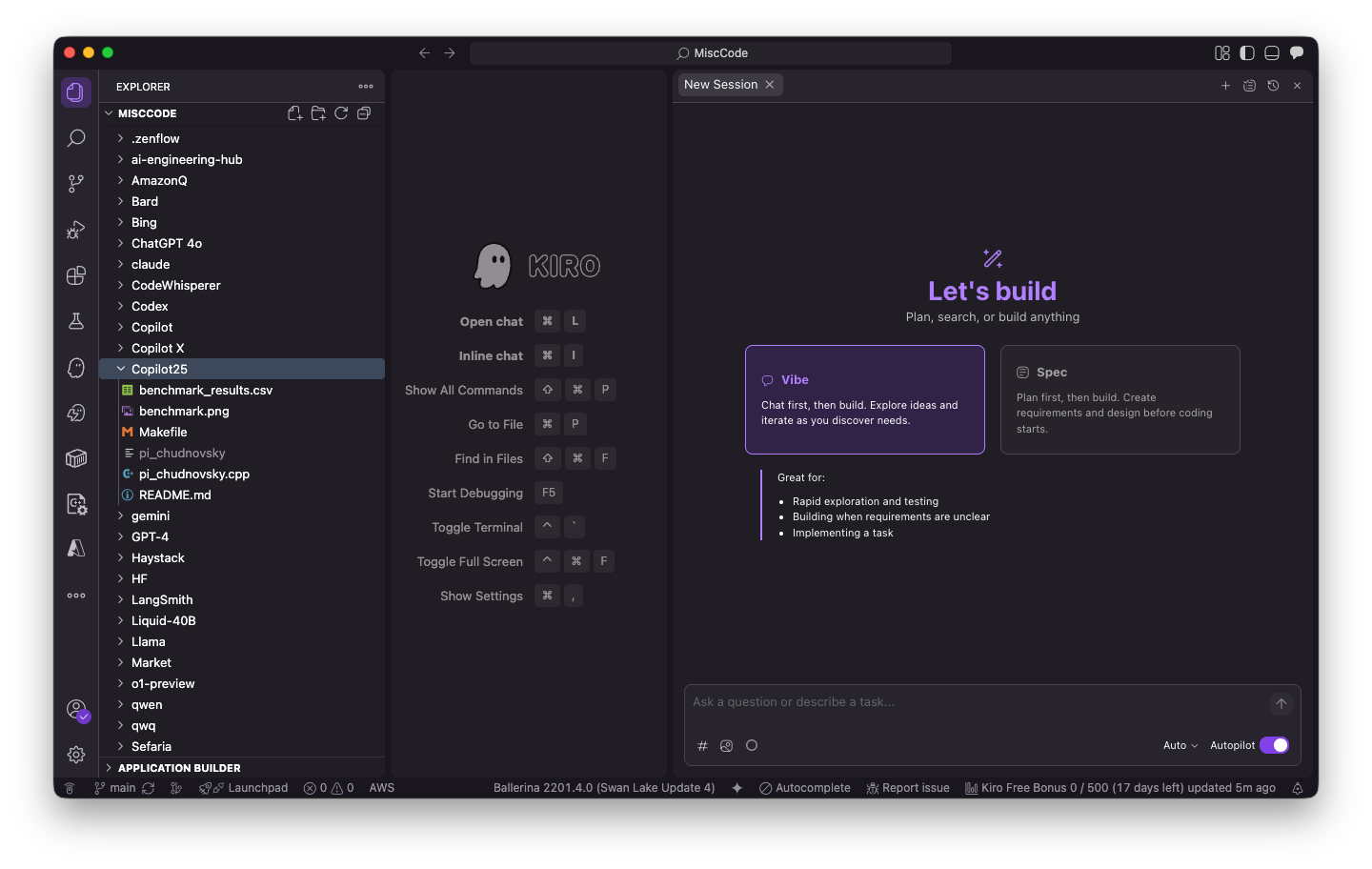
AWS describes Kiro as an autonomous agent that maintains context and learns over time while working on software development tasks independently. Kiro is available both as an IDE (based on Code OSS) and a CLI tool, and was developed by “a small, opinionated team within AWS.” Kiro IDE explicitly supports both vibe coding and spec-driven development. Kiro CLI doesn’t deal with specs at this point, although it does have a planner agent and agent steering.
Kiro SDD generates three markdown files that together comprise the specification.
- Requirements (requirements.md) – Captures user stories and acceptance criteria in structured EARS notation.
- Design (design.md) – Documents technical architecture, sequence diagrams, and implementation considerations.
- Tasks (tasks.md) – Provides a detailed implementation plan with discrete, trackable tasks.
You can also import specs from other systems and iterate on your specs. You can even generate specs based on a vibe-coding session. Ideally, you would create a spec for each project feature.
EARS (Easy Approach to Requirements Syntax) notation captures user stories and follows the pattern:
WHEN [condition/event]
THE SYSTEM SHALL [expected behavior]
This format is clear and testable. Kiro can generate property-based tests (PBT) based on your EARS-formatted requirements; these are more comprehensive than the usual unit tests.
In addition, Kiro can generate three markdown files that together define the steering for the agents. Steering gives Kiro persistent knowledge about your workspace and its conventions.
- Product overview (product.md) – Defines your product’s purpose, target users, key features, and business objectives. This helps Kiro understand the “why” behind technical decisions and suggest solutions aligned with your product goals.
- Technology stack (tech.md) – Documents your chosen frameworks, libraries, development tools, and technical constraints. When Kiro suggests implementations, it will prefer your established stack over alternatives.
- Project structure (structure.md) – Outlines file organization, naming conventions, import patterns, and architectural decisions. This ensures generated code fits seamlessly into your existing codebase.
With my free plan, Kiro IDE currently supports three Claude models, Sonnet 4.5, Sonnet 4, and Haiku 4.5. It can automatically select models if you wish. The documentation also mentions Opus 4.5, which I assume can be activated with a Pro ($20/month) or better plan.
Kiro IDE supports both vibe coding and spec-driven development workflows.
Foundry
Spec Kit
Spec Kit is an open-source toolkit for spec-driven development from Microsoft. It provides a four-phase, structured process to bring spec-driven development to coding agent workflows, and integrates with some 30 coding agents.
You start by installing the specify CLI, using uv for a persistent installation (recommended) or running it once with uvx. The specify command can initialize Spec Kit projects, optionally specify an AI agent, and check for installed tools. Once you have initialized a project your AI coding agent (e.g. GitHub Copilot or Claude Code) has access to several slash commands for structured development:
/speckit.constitution– Project governing principles/speckit.specify– Requirements and user stories/speckit.clarify– Clarify underspecified areas/speckit.plan– Technical implementation plans, including tech stack/speckit.tasks– Actionable task lists for implementation/speckit.analyze– Consistency and coverage analysis/speckit.implement– Execute all tasks/speckit.checklist– Checklists that validate requirements
Spec Kit can generate a project from scratch (Greenfield), modernize legacy code (Brownfield), and explore diverse options in parallel. There’s been some discussion about how Spec Kit is best used and whether Spec Kit is spec-anchored; there’s no general consensus, other than observing that Spec Kit as released prefers a small spec per feature rather than a giant spec for a whole project.
Tessl
The slogan is “Keep your agents on the rails with Tessl.” Tessl tries to do this with a framework and package registry, plus evaluations, all aided by a CLI. The Tessl CLI can scan your project for dependencies and configure Model Context Protocol (MCP) server settings for AI coding agents such as Claude Code, Codex, and Gemini.
The CLI can also search the package registry for “tiles” by name, PURL, or HTTP URL. Tiles contain skills (procedural workflows for the agent), documentation (for libraries and frameworks that agents can query on-demand), and rules (mandatory coding standards and conventions). You can use the existing registry and also create your own skills and tiles.
You can do spec-driven development with Tessl using the Tessl SDD tile. Once that is installed, simply include “use spec-driven development” in your prompt. Then the agent will ask questions and write specs before code. You can improve your results by also installing tiles that document the tools you use from the Tessl skills registry.
Zenflow
Zenflow is a free platform that coordinates AI agents to build software. It features “spec-driven workflows, built-in verification, and multi-agent execution that actually works.” Another term for coordination is orchestration, and Zenflow is also described as an orchestration layer.
Developed by the Zencoder team, Zenflow works with the Zencoder plugins. (And features from Zenflow, such as guided workflows, have been added to Zencoder.) The CEO of Zencoder, Andrew Filev, told me that his team of experienced engineers has been using Zenflow for their own product development for over a year when I questioned whether it is ready for production code.
The high-level description of the relationship between Zencoder and Zenflow is that Zenflow is the workflow brain and Zencoder executes the work. You may have noticed some naming confusion: Zencoder is not only the name of the company and the name of its AI plug-in for IDEs, but it is also the name of the company’s in-house coding agent, which is one of four agent options for Zenflow (the others being Claude Code, Codex, and Gemini) and one of at least nine models available to the Zencoder plug-in.
When you start a Zenflow project, you’re offered a choice of standard workflows: Quick Change, Fix Bug, Spec and Build, or Full SDD Workflow, depending on scope. The wider the scope, the more structure you need in the workflow to keep the implementation from drifting away from the requirements. You can also define your own workflows, perhaps to conform to your shop’s standards.
Zenflow can run multiple tasks in parallel in isolated environments. The agents coordinate within workflows without corrupting your codebase.
Zenflow automates verification of its changes. Every workflow runs automated tests and cross-agent code review. Failed tests trigger automatic fixes. Your code ships only after passing all of the verification gates.
Zenflow projects are broken down into tasks, and those are divided into subtasks and chats. Each task runs inside its own isolated Git worktree. You can view the status of all tasks in Kanban boards or stacked list views.
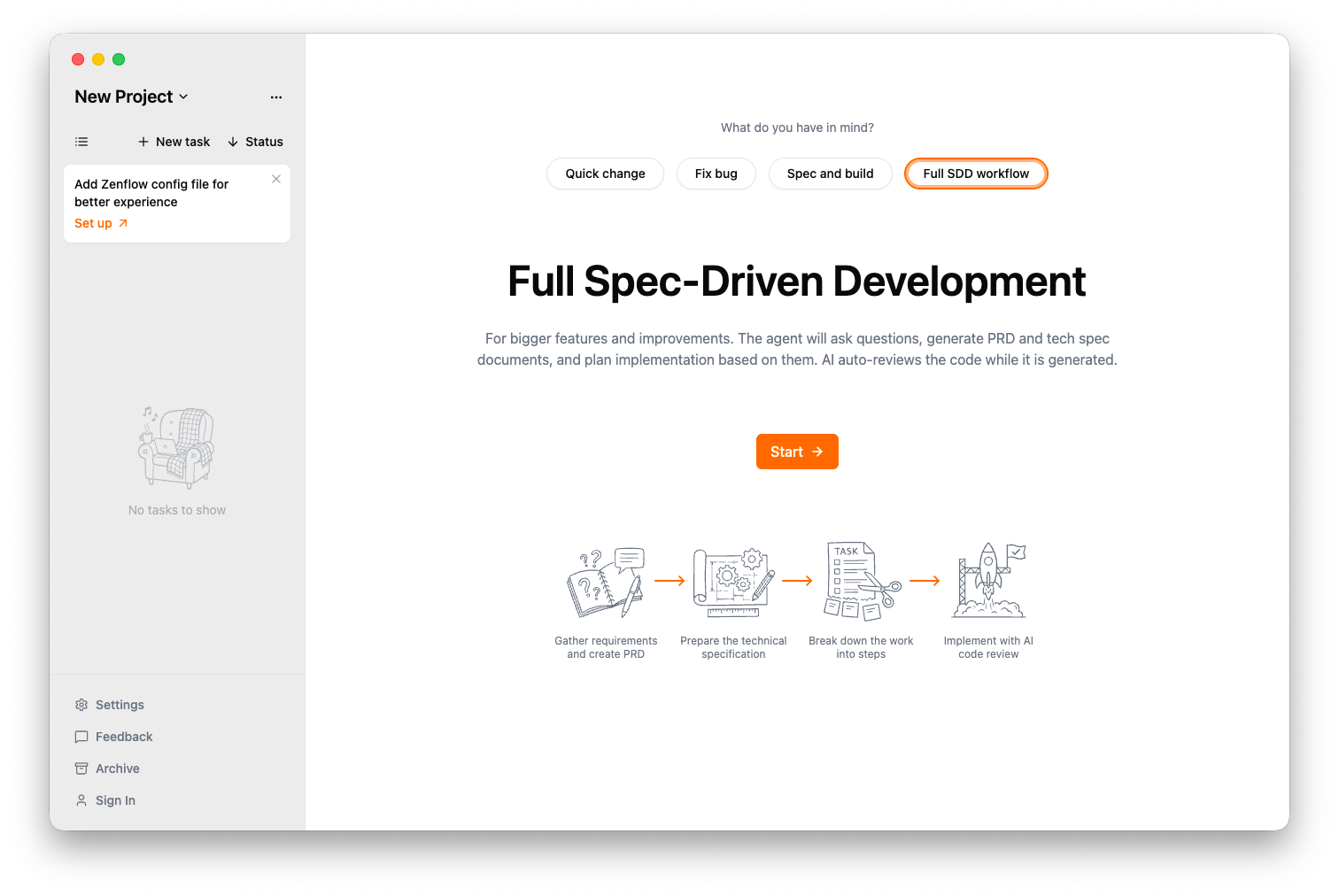
Zenflow supports multiple workflows, from quick changes all the way up to full SDD. You can also define custom workflows.
Foundry
Feel the vibes?
Where and when does software-driven development make sense? In broad strokes, you can get away with doing AI-assisted coding without specs for personal projects, small features, and bug fixes. You need specifications to keep AI coding agents on the rails for large features, major refactoring, and enterprise-level projects.
Which spec-driven development tool should you use, if any? That depends entirely on your environment, your goals, and your personal and team preferences. Kiro, Spec Kit, Tessl, and Zenflow are all good places to start.
Go to Source
Author: